


Hi Jeff,
First, thanks for the plugin — the glossary structure and Term Studio are exactly what I needed, and I've built it out quite far. I'm probably running one of the largest installs out there, so I wanted to share some performance data that may be useful as you plan ahead.
My setup
- 644 glossary terms, each with a full definition
- ~1,300 articles that link to them automatically
- Single WordPress site, roughly 2,000 indexed pages
What I measured
The generated term map (/wp-content/uploads/clevlite-map/map-*.js) is now 454 KB uncompressed, and it loads on every page of the site, including articles that reference no glossary term at all.
Breaking down its content:
| Total file size | 454 KB |
tip fields (tooltip definitions) |
334 KB — 74% of the file |
| Everything else (id, term, url, canonical, relationship) | ~120 KB |
So roughly three quarters of the payload exists solely to power hover tooltips.
Why this matters
Two problems compound here.
First, tooltips don't exist on mobile. There's no hover on touch devices. Yet mobile visitors still download and parse all 334 KB of tooltip text they can never trigger.
Second, the file is served with Brotli, so the network transfer is fine — the cost is parsing and execution, and compression doesn't help there.
Here's what Lighthouse reports on one of my article pages (PageSpeed report):
- 526 KB of unused JavaScript flagged (essentially this file)
- 1.7 s of JavaScript execution time
- 2.7 s of main-thread work
- 8 long tasks on mobile
- CLS 0.231 on desktop — Lighthouse also flags a forced reflow, which I suspect comes from
linked-terms.jsinserting links into already-rendered text - Mobile lab LCP: 7.4 s on a throttled 4G connection
Google Search Console flags 1,000+ URLs on my site for CLS as a result.
One more angle worth knowing about: PageSpeed now has an "Agentic navigation" category — how readable a site is for AI agents. My page scores 1/3 on desktop, and CLS is one of the two failing audits. So this now affects AI visibility, not just Core Web Vitals.
What would help
A few ideas, in rough order of how much they'd help me:
- An option to exclude
tipfields from the generated map. Even just a toggle — sites that don't use tooltips, or that accept losing them, would drop the file by ~75% instantly. - Load tooltip definitions on demand, via a small REST request on hover, rather than shipping all of them upfront. Best of both worlds, and it would scale to any glossary size.
- A filter hook on the map data before it's written, so site owners can strip fields themselves without patching the plugin.
- Only enqueue the map where it's needed — glossary pages and posts that actually contain linked terms.
Is there already a way?
Before I work around this myself: is there an existing setting or filter to disable tip generation that I've missed? I've gone through General, Styling and Add-Ons without finding one. If there's a hook I can use today, that would unblock me immediately.
Happy to run tests on my install if that's useful — I have a large, real-world dataset and I can measure before/after on request.
Thanks again for the work,
Fabien — youtips.com

Jeff Brigman is this plugin MCP friendly?

This update is a performance and reliability hotfix focused on larger glossaries, frontend tooltip payloads, block/embed rendering, and relationship phrase linking.
The biggest improvement is how Clever Linked Terms handles tooltip data on the frontend. Tooltip payloads are now much smaller, the Tooltip Characters setting is respected properly, and linked terms no longer duplicate large tooltip data directly into every linked item on the page.
What’s improved:
– Better frontend tooltip payload performance for larger glossaries
– Tooltip payloads now respect the Tooltip Characters setting
– Tooltip text now prefers term summaries/excerpts before falling back to definition content
– Reduced duplicated tooltip data in linked term markup
– Improved block/embed rendering safety on glossary term pages
– Fixed relationship phrase linking setting persistence in some configurations
Thank you to Fons for reporting the payload issue.
The update should be available through WordPress.org/plugin updates in less than 6 hours.
Plugin page:
https://wordpress.org/plugins/clever-linked-terms/
Hi Jeff,
I run a French glossary of 502 terms on youtips.com using Clever Linked Terms 1.2.1, and I had to disable the WordPress Content module because every page on the site had grown to roughly 4 MB. I dug into the cause and wanted to share what I found, since I think three of these are straightforward fixes on your side and would benefit anyone running a large glossary.
1. The whole glossary is serialised inline on every page
Clevlite_WPContent::enqueue_assets() builds the payload with 'tip' => $t['definition'], where the definition is the entire post_content of the term, stripped of tags. With 502 terms averaging 11,110 characters each (longest: 48,866), the window.CLEVLITE = {...} inline script measures 3.66 MB, and it is re-sent on every single page load.
Measured on my install:
| Full inline payload | 3.66 MB |
— of which tip values |
3.15 MB |
| Same payload without tips | 519 KB |
| Same payload, tips capped at 200 chars | 617 KB |
The tooltip only ever displays the first couple of lines, so the remaining ~3 MB is downloaded and parsed for nothing, on every page.
2. The tooltip-length setting is read but never applied
This one looks like a simple oversight. In includes/class-portal-assets.php, build_terms_payload() opens with:
private static function build_terms_payload(): array {
    $tip_chars = Clevlite_Settings::tipchars();   // line 169
$tip_chars is never used anywhere below. The Tooltip characters setting in the admin UI therefore has no effect at all. Applying it in both payload builders would fix the size problem on its own.
3. The two payload builders disagree
Clevlite_PortalAssets::build_terms_payload() (FluentCommunity) prefers post_excerpt when it exists:
$tip = $t->post_excerpt ?: wp_strip_all_tags($t->post_content);Clevlite_WPContent::get_all_terms() (WordPress content) ignores post_excerpt entirely and always takes the full post_content. Aligning the WordPress path on the FluentCommunity behaviour, and honouring tipchars in both, would make the two modules consistent.
4. Definitions are re-encoded in base64 on every occurrence
In assets/linked-terms.js, lines 621 and 623, each matched term gets the full definition base64-encoded into a data-clevlite-tip-b64 attribute:
'... data-clevlite-tip-b64="' + escAttr(b64encode(termData.tip)) + '"'Base64 adds ~33%, and the attribute is written once per occurrence. With maxLinks = 4, an 11 KB definition appearing four times adds roughly 60 KB to the DOM for that single term. Looking the definition up by data-term-id in the existing array at hover time would avoid the duplication entirely.
5. the_content is re-entered on itself
includes/class-cpt.php, lines 746–748:
remove_filter('the_content', [$this, 'append_relationships_to_single_term'], 20);
$rendered = apply_filters('the_content', $raw_content);
add_filter('the_content', [$this, 'append_relationships_to_single_term'], 20);
Only your own callback is detached, so every third-party the_content filter runs twice on glossary term pages. In my case a related-terms block I had added rendered twice, with a duplicated HTML id. I worked around it with a nesting-depth guard, but other plugins hooking the_content will hit the same thing without knowing why. Passing the raw content through a narrower set of filters, or setting a public flag while re-entering, would spare them the surprise.
6. Feature request: allow the glossary CPT in Post Types
includes/settings-tab-wordpress.php, line 29:
unset($clevlite_post_types['clevlite_term'], $clevlite_post_types['attachment']);I understand excluding attachment, but excluding clevlite_term means glossary entries can never link to one another. On a 502-term glossary, that is exactly where interlinking carries the most value — and it leaves every entry as a dead end for crawlers. If the concern is self-linking, filtering out the current post ID from the payload on singular views would handle it. An opt-in checkbox would be very welcome.
What I did on my side
Rather than patch your plugin (which updates would overwrite), I wrote two small mu-plugins:
- One intercepts the inline script before it is printed, truncates each
tipto 300 characters, and serves the payload from a content-hashed external.jsfile. Pages went from ~3.8 MB to 170 KB; the map is now downloaded once per visit instead of once per page, and cached for a year. - One adds a server-side "See also" block at the bottom of each glossary entry, since the plugin cannot link entries to each other.
Both are workarounds for the outside. Fixes 2 and 3 in particular seem cheap and would help every install with a sizeable glossary.
Happy to test a patch or share the mu-plugin code if that is useful. Thanks for the plugin — the tooltip UX itself is genuinely nice, and the glossary is central to my site.
Best regards,
Fabien Fons
YouTips — youtips.com
This update improves the Gutenberg / WordPress Block Editor support introduced in v1.2.0, with fixes focused on reliability, block embeds, and the Term Studio editing experience.
If you’re using the Block Editor for glossary term definitions, this update improves how block-based content renders on the front end and fixes an issue where scrolling inside the embedded Block Editor could stop working.
Term Studio still manages the structured glossary fields like summaries, sources, relationships, tags, SEO, and linking settings, while the Block Editor can handle richer definition content when enabled.
What’s improved:
– Improved Block Editor support inside Term Studio
– Fixed block embeds and dynamic block rendering on glossary term pages
– Fixed scrolling inside the embedded Block Editor
– Improved reliability for block-based definition editing
– Classic/WYSIWYG definition editing remains available when Block Editor support is disabled
The update should be available through WordPress.org/plugin updates in less than 6 hours.
Plugin page:
https://wordpress.org/plugins/clever-linked-terms/
v1.2.0 has been sent to the repository, and should be available for update in 24hours via your dashboard. This version adds support for Gutenberg/Blocks Builder in the Term Studio editor. You have to enable this in the settings as the default is the TS Editor.

Hi!
I've been messing around with having Clever Linked Terms in the FluentCommunity template and for some reason, it creates a huge gap when I do! Offset setting is at 0.
You can check it out here on the staging site: https://staging.shanistutoring.com/glossary/
This update focuses on smoother management, better compatibility, and cleaner workflows for larger glossaries. Please note that WP has finally decided to implement safeguards against instant availability of a plugin update via dashboard whenever a dev pushes their update to the Repo. They now require a 24 wait for review on all updates, so you should see an update notice tomorrow this time.
What’s new:
- Optional SEO fields in Term Studio, with support for SEO title, meta description, Open Graph title/description, and social image.
- SEO plugin detection for Yoast SEO, Rank Math, SEOPress, and All in One SEO.
- Duplicate term detection when creating new terms or importing terms, with duplicates saved as drafts for review.
- Faster admin workflows with AJAX-style filtering/search and pagination for Term Manager and heavier Terms Engine screens.
- New optional compatibility fields for placing shortcode/content before or after the definition and metadata areas on single term pages.
- Better import/export handling, including SEO fields and compatibility placement fields.
- Improved CSV/XML downloads and export handling for larger glossaries.
- More performance polish around Terms Engine, relationship data, and optional module loading.
Clever Linked Terms is free on WordPress.org:
https://wordpress.org/plugins/clever-linked-terms/
User Manual:
https://jeffbrigman.com/clever-linked-terms-user-manual/
Change Log:
https://jeffbrigman.com/clt-change-log/
Join the community:
Clever Linked Terms v1.1.0 is coming soon.
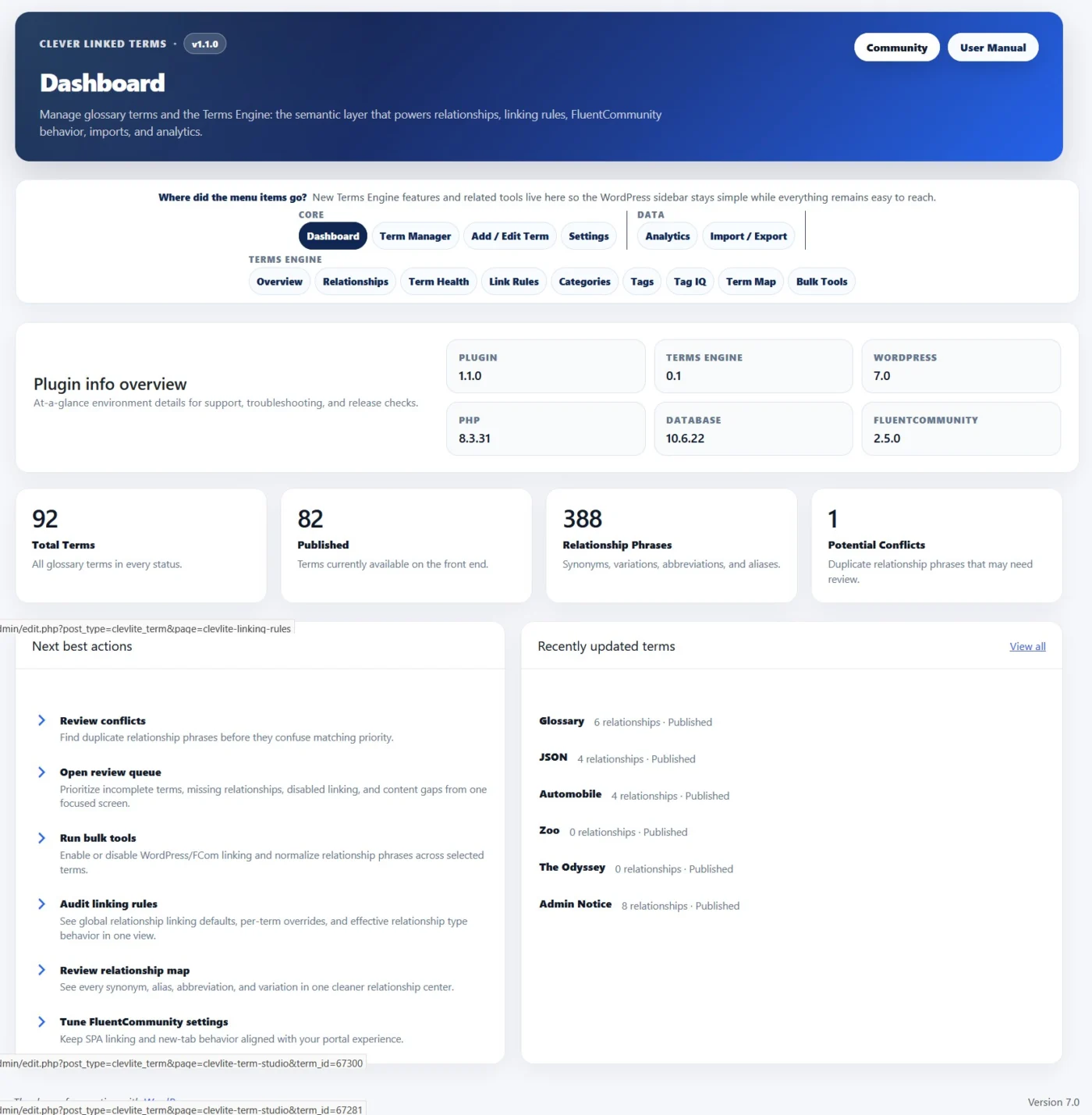
This is the biggest release yet for Clever Linked Terms, and it marks a major step forward from a glossary/linking plugin into a full semantic linking and relationship engine for WordPress, FluentCommunity, and content-heavy websites.
The heart of this release is the new Terms Engine.
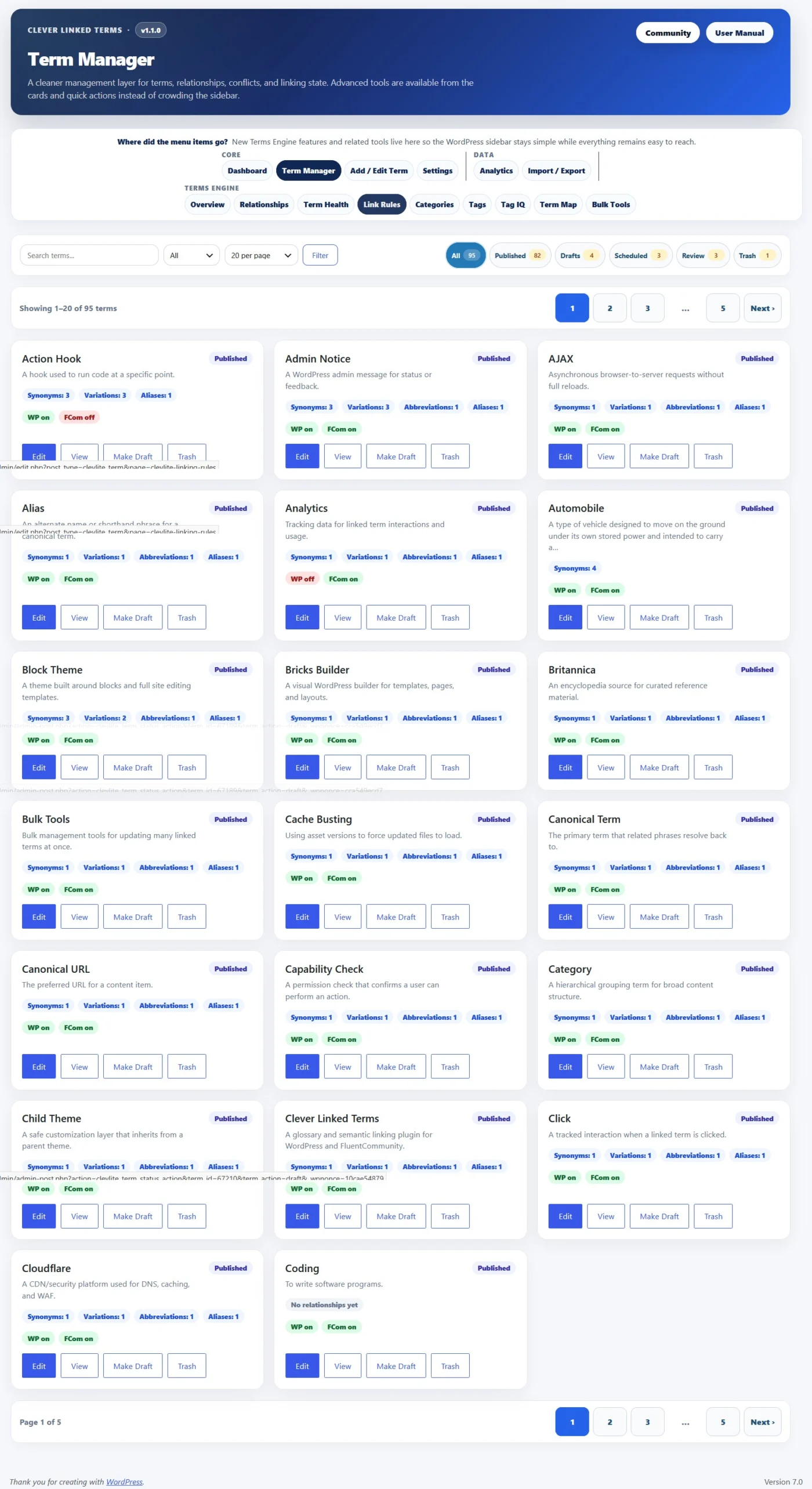
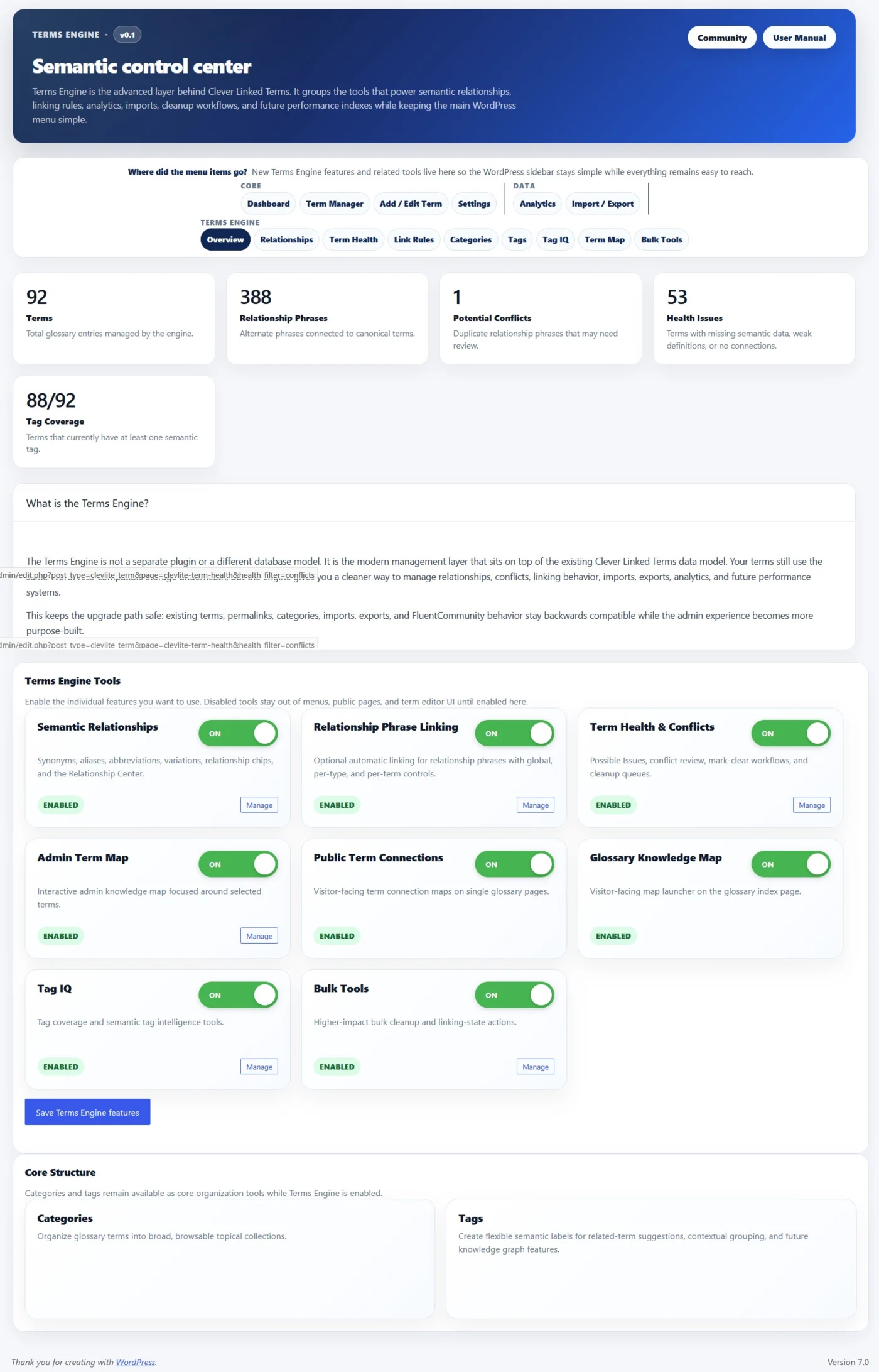
Terms Engine gives you a dedicated control center for managing relationships, term health, link rules, maps, tags, conflicts, and semantic structure. It is optional, modular, and can be enabled only when your site needs those deeper tools.
Here is what is new in v1.1.0:
- Terms Engine. A new semantic control center for relationships, term health, link rules, categories, tags, Tag IQ, term maps, and bulk tools.
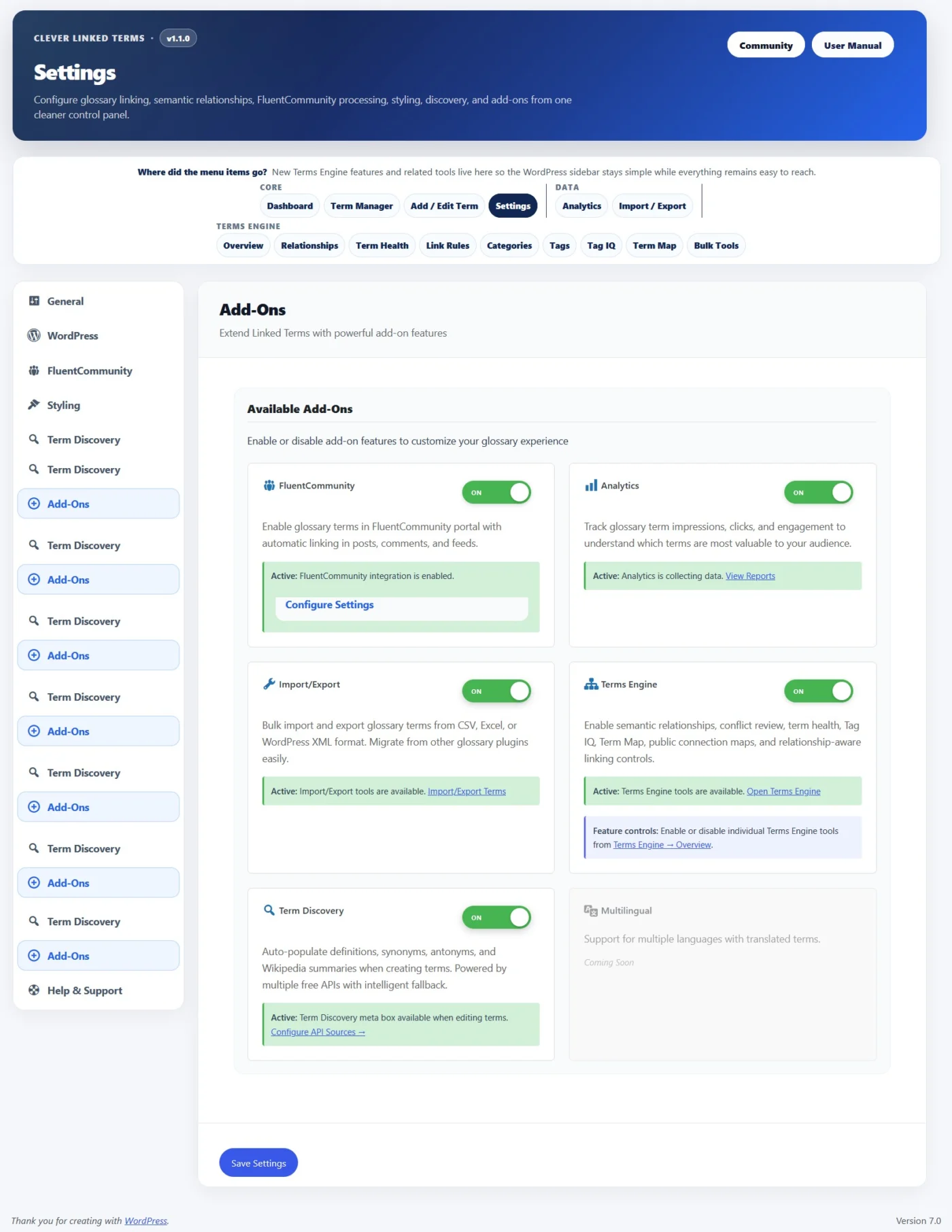
- Modular Feature Controls. Terms Engine can be enabled as an add-on, and individual tools can be turned on or off from the Terms Engine Overview. This keeps smaller glossary sites clean while giving larger sites room to grow.
- Semantic Relationships. Glossary terms now support synonyms, aliases, abbreviations, and variations so different words or phrases can point back to the correct canonical term.
- Relationship Phrase Linking. Relationship phrases can optionally link back to their parent term, with global settings, per-type controls, and per-term overrides.
- Term Health. A new review area helps identify possible issues, relationship conflicts, duplicate phrases, and terms that may need editorial cleanup.
- Admin Term Map. Explore how terms connect through shared tags, shared categories, and semantic relationships. Clicking a term can refocus the map without reloading the page.
- Public Term Connections. Single term pages can show visitor-facing relationship maps so readers can explore related concepts.
- Glossary Knowledge Map. Glossary index pages can now include a larger visitor-facing map behind a smooth “View glossary map” launcher, so it is available without taking over the page.
- Term Studio. A cleaner term editing experience for titles, slugs, statuses, scheduled terms, tooltip summaries, WYSIWYG definitions, sources, categories, tags, exclusions, and Terms Engine fields.
- Term Manager Improvements. The term manager now includes a card-based interface, better filters, status chips, pagination, and a terms-per-page selector for large glossaries.
- Glossary Index Improvements. You can now set both the glossary index slug and title, choose from multiple layouts, control whether index content is auto-linked, ignore leading words like “a,” “an,” and “the” for sorting, and adjust sticky header behavior.
- Single Term Page Improvements. New layout options, better source/tag/category display, public connection maps, and “Back to [Index Title]” buttons that use your actual glossary title.
- Term Discovery Improvements. Fetched definitions and summaries now preserve editor formatting better, sources are routed into the Sources field, and synonyms are normalized into separate values instead of one long line.
- Import/Export Updates. CSV/XML workflows now support v1.1.0 fields including sources, tags, relationships, exclusions, scheduled status, and relationship linking controls.
- Analytics Add-On. Optional analytics can track impressions, clicks, matched phrases, relationship types, context, and FluentCommunity-aware activity.
- FluentCommunity Support. SPA-aware processing helps glossary links and tooltips continue working after FluentCommunity portal navigation and feed updates.
- aOS/AdminOS Compatibility. Clever Linked Terms can now register as an app inside aOS/AdminOS when available, with routes for Dashboard, Terms, New Term, and Settings.
- Performance Improvements. Public maps and glossary knowledge maps use lazy-loading and cached rendering patterns so heavier visual tools do not slow down the initial page load.
- This release also includes WordPress 7.0 compatibility metadata, Plugin Check cleanup, stronger sanitization/escaping, improved readme content, and a lot of release hardening for the WordPress.org plugin directory.
Clever Linked Terms is free and available on WordPress.org.
Download/update here:
https://wordpress.org/plugins/clever-linked-terms/
User Manual:
https://jeffbrigman.com/clever-linked-terms-user-manual/
Join the community:
https://jeffbrigman.com/community/space/linked-terms/home
New version is out today.
This release is a big step forward for Clever Linked Terms. What started as a smarter glossary/linking plugin is now moving toward a full semantic linking system for WordPress and FluentCommunity.
The main focus in v1.0.10 is relationship-aware linking. You can now add synonyms, variations, abbreviations, and aliases to your glossary terms so different words or phrases can all point back to the correct main term. This is especially useful for communities, documentation sites, course platforms, and content-heavy websites where people may use several different names for the same idea.
Here is what is new in v1.0.10:
Semantic Relationships. Glossary terms now support synonyms, variations, abbreviations, and aliases. These relationship phrases link back to the parent term, share the same tooltip content, and help keep your content connected without needing to create duplicate glossary entries.
Relationship-Aware Analytics. Analytics now tracks more than just basic clicks and impressions. It can also record the matched text, relationship type, and canonical term, so you can see whether users are interacting with the main term, a synonym, an alias, an abbreviation, or a variation.
Better FluentCommunity Support. FluentCommunity compatibility got a major cleanup in this release. Analytics tracking now works properly inside FluentCommunity’s Vue/SPA portal, and glossary links clicked inside FluentCommunity open in a new tab so users do not lose their place in the community.
Cleaner Admin Management. The Linked Terms admin list now shows relationship counts, linking status, and conflict warnings directly in the term table. This makes it much easier to manage larger term libraries without opening every single term just to see what is going on.
Conflict Warnings. If the same synonym, alias, abbreviation, or variation is used on more than one term, Clever Linked Terms now warns you. This helps prevent confusing or competing links before they become a problem on the front end.
Improved CSV Import/Export. Relationship metadata is now included in import/export workflows, making it easier to move, back up, or bulk manage glossary data.
FluentCommunity New-Tab Links. Glossary links inside FluentCommunity now open in a new tab by default. Standard WordPress posts and pages still open normally in the same tab.
Analytics Stability Fixes. This release fixes several tracking issues, including FluentCommunity analytics loading, relationship metadata capture, and duplicate tracking risks between normal WordPress pages and the FluentCommunity portal.
This update also includes several behind-the-scenes fixes, version cleanup, readme updates, safer frontend output, and release hardening for the WordPress.org plugin directory.
Clever Linked Terms is free and available on WordPress.org.
Download/update here:
https://wordpress.org/plugins/clever-linked-terms/
User Manual (webpage):
https://jeffbrigman.com/clever-linked-terms-user-manual/